




e2Audio: Element Microphones and Mondo Music Software

e2Audio

Analog soul. Digital imagination.

Two sides of the same coin, made for creators. Element Microphones captures the performance; Mondo Music Software develops the idea.

TapClick either title above to explore

Three tube mics. Five adjustable tube voltages.

High Quality – Hand-Built Tube Condenser Microphones

Each one is voiced after a classic microphone family, then refined by ear until it earns its place on a session.

Earth 67 is the versatile workhorse, at home on vocals, guitars and anything in the room.

Air 51 is open and detailed, with a clear, defined top end that lets a voice cut through.

Sol 49 is warm, silky and full, the one to reach for when a voice needs body and weight.

Ordered direct from the people who build them.

Earth · Air · Sol

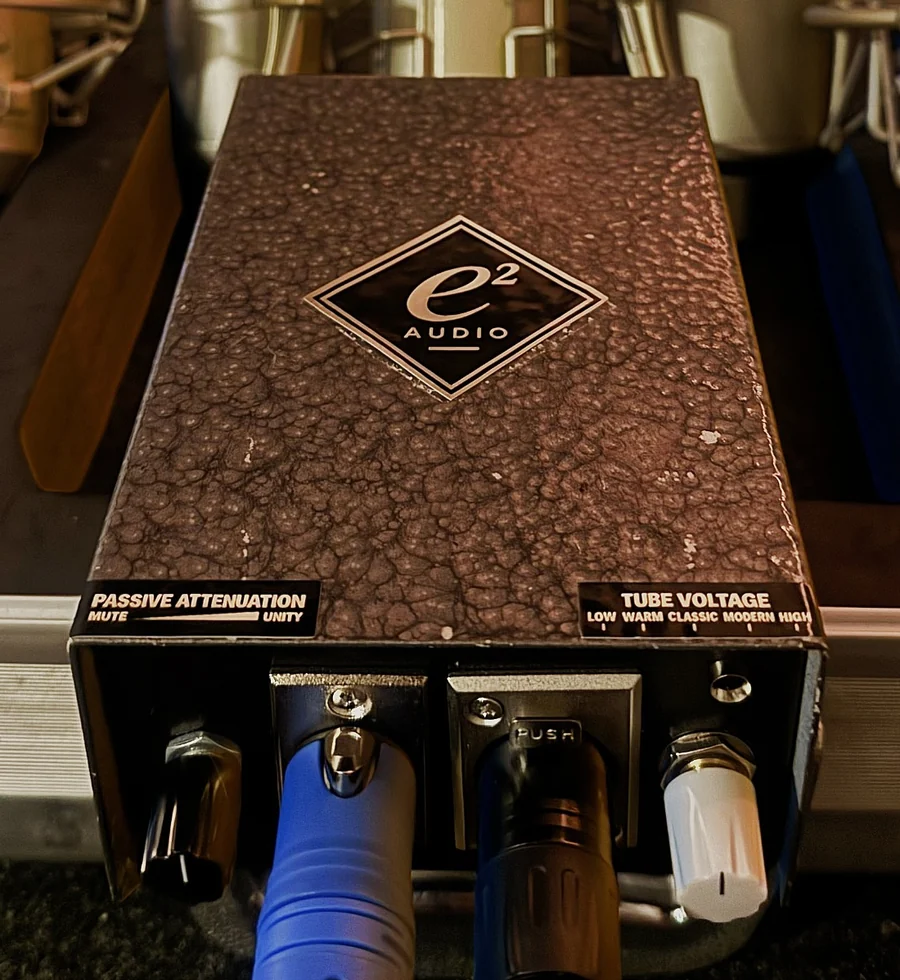
The adjustable tube-voltage power supply

Choose the microphone’s character. Then dial in the level feeding your recording chain.

The adjustable tube-voltage power supply · click to enlarge

The adjustable Tube Voltage control gives you another way to shape the recording at the microphone. Changing the tube’s operating voltage can change its harmonic behavior, its headroom and how it responds to a performance: the texture of a voice, its body, the bite of the attack, how open it feels and how it sits in a track.

Explore the settings to find the response that suits the voice, the instrument or the arrangement. A higher-voltage setting may also produce a somewhat higher output, depending on the microphone and the setting. The Passive Attenuation control lets you keep your chosen voltage setting while trimming the signal feeding your preamp and tracking chain.

Tube Voltage

Changes the operating conditions.

Five fixed positions, from Low through Classic at noon to High. Each one sets the voltage the tube runs at, which can change how it saturates, how much headroom it has and how it reacts to a dynamic singer. Five clear choices make it quick to compare and easy to come back to.

Passive Attenuation

Reduces the outgoing audio level.

A passive trim between the microphone and your preamp, from Unity down to Mute. It never adds gain and it doesn’t undo anything already shaped upstream: it simply sets how hard the signal hits the preamp, so you can keep the character you chose and still find the right level.

  1. Compare at similar loudness. Trim each voltage setting to a matched level before you decide, so a louder setting doesn’t automatically sound better.
  2. Keep the character, change the drive. Hold on to the Tube Voltage setting you like and use attenuation to control how hard the signal hits the preamp.
  3. Find the chain’s sweet spot. Balance mic output, preamp gain and the compression and EQ after it until the whole tracking chain is working in its best range.
  4. Try a different setting per part. Lead vocal, doubles, harmonies, a quiet verse and a big chorus can each get the response that suits them.

How each setting sounds depends on the circuit and the source. We’ll describe Element’s settings from our own controlled, level-matched tests, and publish final values for each position once they’re confirmed.

Listening room

Hear every element

Audio examples will be added

Element Microphones

Earth 67

U67-style inspiration

Classic · Unity

Dry /
Processed
Dry
Solo
Instrumental

No microphone audio yet. Matched recordings of each mic will be added here.

Signal path (illustration of the current routing)

    Patch into
    Element Vocal

    Patch-through

    Element Vocal

    Our tube supply into a 500-series-style tracking chain: preamp, de-esser, two EQs, two compressors and a tube opto. Patch the listening room in and every control is live, or drop your own recording in below and hear it through the 500-series rack.

    ELEMENT VOCAL

    Input: not patched

    Tube voltageClassicposition 3 of 5
    AttenuationUnity
    Power
    supply
    E73Mic pre Input
    Trim
    E02De-esser Freq
    Thresh
    Ess
    E50Equalizer
    HF
    MF
    LF
    E51Inductor EQ
    HF kHz
    MF Freq
    LF Hz
    HPF In
    E76FET compressor
    Input Output
    Attack Release
    Ratio
    E2WTube compressor
    Input Output
    Attack Recovery
    E1BTube optical compressor
    Threshold Ratio Attack Release Gain
    Comp
    Drop your own audio in below, then press Play. Turn any knob to hear it.

    Patch your own audio

    Drop a vocal (or any recording) onto the box and press Play. It is patched straight into the input of the 500-series rack (the E73 preamp, after the mic and power supply). Turn any rack knob or switch while it plays.

    The chain runs left to right: the tube supply, the E73 preamp, E02 de-esser, E50 and E51 EQs, the E76 FET compressor and the E2W tube compressor, with the E1B optical compressor last. This is an interactive view of the patch-through. No microphone recordings are on this page yet; only a file you choose yourself plays here, and it never leaves your computer.

    The reference families

    Three classic characters, and why you’d pick each

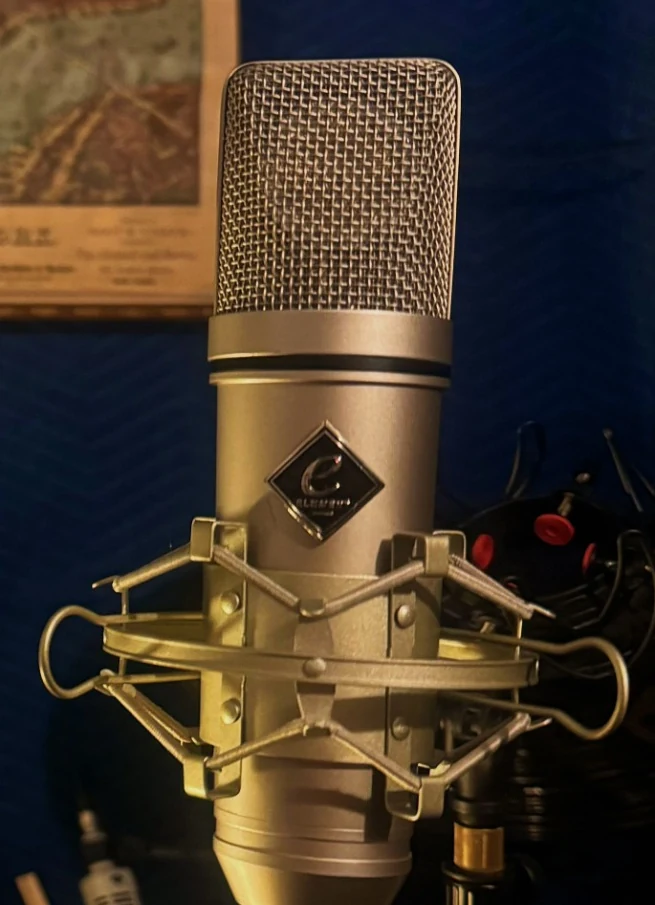
    Sol 49 · Air 51 · Earth 67, left to right, in the live room

    Each Element model starts from a classic microphone family. Here is what those families are loved for, and where each Element is headed. The family descriptions explain the inspiration; they aren’t specifications or performance claims for our microphones.

    Earth 67

    U67-style inspiration

    The family: the versatile studio workhorse. A smooth upper register and a balanced presentation that suits almost any voice and a long list of instruments.

    Reach for it when: you want one mic you can put up first and trust, on a lead vocal, an acoustic guitar, a room or a horn section.

    Our Earth 67: our reference build is voiced toward a smooth, controlled top end. We’re matching further builds to that reference now.
    Air 51

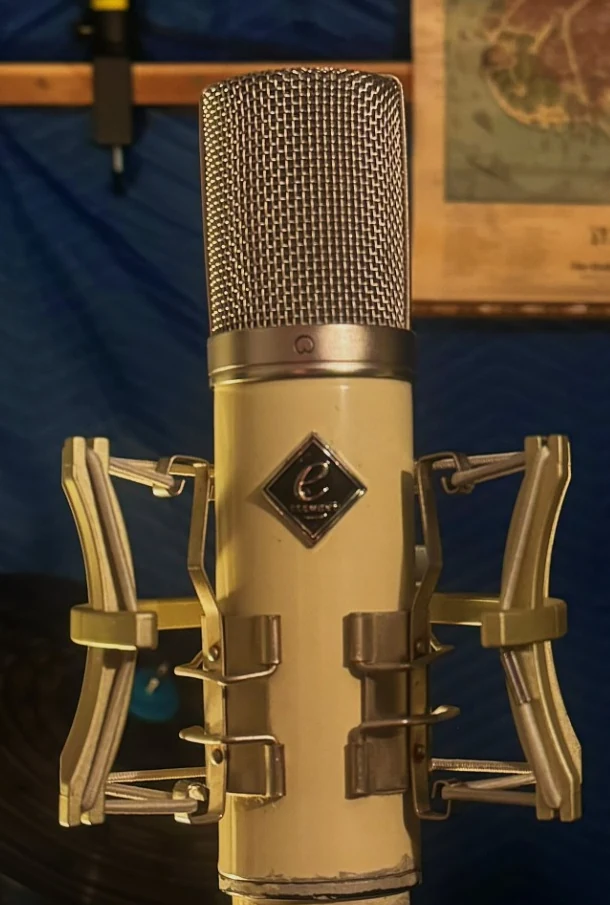
    251-style inspiration

    The family: an open, detailed presentation that pairs upper-frequency air with real body and definition.

    Reach for it when: a voice or instrument needs to come forward with clarity and sparkle without losing its weight.

    Our Air 51: the next build moves into a 251-style body. Today’s photos show the development enclosure.

    Sol 49

    M49-style inspiration

    The family: a warm, silky presentation with vocal depth and a sense of fullness that keeps its clarity.

    Reach for it when: you want intimacy and size: a close, soft vocal, a ballad, a voice that should feel big without getting bright.

    Our Sol 49: its reference voicing passed our listening approval; we’re finishing the mechanical fit and layout.

    Choosing between them: start with Earth for balance and versatility, Air when you want openness and detail up front, and Sol when warmth and fullness matter most. Then use Tube Voltage to fine-tune the response for the song.

    From the listening room to the workbench

    How an Element gets made

    01 · Listen

    Dozens of prototypes, one listening room

    Getting to three microphones took dozens of prototype and reference builds. Every one was recorded the same way and compared by ear, so the differences we heard were the mics’, not the setup’s.

    Development photo: prototype and reference builds, not products for sale.

    02 · Compare

    Side by side, at matched levels

    We compare builds and settings at the same loudness, then listen for what changes: texture, body, attack, openness and how the part sits.

    03 · Refine

    Inside, by hand

    The circuits are handwired and easy to see. Between listening rounds we change one thing at a time, so each refinement can be heard and kept or rejected.

    04 · Select a reference

    One build becomes the target

    When a version wins the listening rounds, it becomes the reference the next builds are matched to: same voicing, same supply, checked by ear and on the bench.

    05 · Build consistently

    Small runs, matched to the reference

    The development bench holds more ideas than the lineup. Only the models that pass every round become Element products, and the first run is Earth 67, Air 51 and Sol 49.

    Development photo: includes microphones that are not part of the current lineup.

    Who builds Element

    Two people, one listening room

    Eric Brody

    Product direction · voicing · listening evaluations

    Eric leads what Element sounds like: which references we chase, how each model is voiced and which builds pass the listening rounds.

    Erick “Emtek” Miller

    Engineering · builds

    Emtek leads the engineering and the builds: the circuits, the power supply work and turning a winning reference into microphones that match it.

    Element began with a collection of custom-built tube microphones from a builder’s estate. In our own shootouts, a few of them kept winning, so we took them apart, learned what made them special, and built our own versions with changes of our own. The first run is all cardioid.

    Element Microphones is one half of e2Audio. Mondo Music Software develops musical ideas; Element Microphones captures performances.

    Contact us to order.

    Element microphones are sold directly, not through an online store, and inventory is limited. Tell us which mic you’re interested in and we’ll write back from contact@e2-audio.com.

    Which mic
    I'd like

    Optional. Sending an enquiry doesn't sign you up for anything; we only use your email to answer it.

    How we handle your details: Privacy Policy.

    Or write to us directly:

    e2Audio logo

    Mondo Music Software

    From spark to sound. No loops. No limits.

    Mondo turns every chord you play into a full arrangement.

    Magna is a synthesizer full of record-ready, fully tweakable sounds.

    Mojo Groovebox: drum machine and step sequencer in one.

    All three are in development. Also from our studio: the Element Plugin Series, and the rest of the lineup in All Plugins.

    Three elements. One system.

    From spark to sound. No loops. No limits.

    Mondo, Magna and Mojo work together as one streamlined workflow, with none of the tedious busywork that breaks your creative flow, so writing and producing stay fun the whole time. Together they give you every tool you need to write and produce an entire instrumental from scratch, without relying on a single premade loop.

    How they’ll be sold. Mondo will come with Magna and Mojo built in. Magna and Mojo will also be sold on their own, and if you already own either one, Mondo will cost you less. Beta placeholder prices for now: Mondo $75 with Magna and Mojo included, Magna $25, Mojo $50 (USD). Final prices and the owner discount will be set before checkout opens.

    In development, with no release date. Anything marked Coming isn’t in today’s builds yet; everything else runs in the current builds and is still being tested.

    The flagships

    Mondo + Magna + Mojo

    Mondo

    01Creation Station

    Turns every chord you play into a full arrangement.

    $75 USD with Magna and Mojo included · beta placeholder price

    Development build · click to enlarge
    • Chord explorer in any key and scale, ready-made progressions, an alternative chord bank
    • Bass, Chord, Arp, Drum and Thru engines on their own MIDI channels
    • Eight named Engine Scenes per project, with scene timing
    • Capture the generated performance as MIDI directly to each instrument track in your DAW
    • Ready-made Mondo Combos for Ableton Live in the factory library
    • ComingThe Magna and Mojo engines built in, so a whole Combo loads as one plugin on one track
    • ComingHost your own instruments in the engine slots, and PRINT each engine to its own MIDI track

    In development. Anything marked Coming isn’t in today’s build yet; the rest runs in the current development build.

    VST3 · AUIn development
    Explore Mondo →

    Magna

    02Synthesizer

    Record-ready sounds, every one fully tweakable.

    $25 USD · beta placeholder price

    Development build · click to enlarge
    • A broad library of record-ready presets in 17 categories: all killer, no filler
    • Every sound fully tweakable, from a few big knobs to a real two-layer synth
    • Dark, Bright, Wide and Tight variations of any sound
    • Arpeggiator, modulation and a five-section effects chain
    • Favorites and your own saved sounds

    In development. We only describe what runs in the current development build; features still on the roadmap aren’t listed here.

    VST3 · AUIn development
    Explore Magna →

    Mojo Groovebox

    03

    Drum machine and step sequencer in one.

    $50 USD · beta placeholder price

    Development build · click to enlarge
    • A powerful step sequencer: program the grid or play the pads, with note repeat and swing
    • An automatic sample organizer: point it at your folders and it catalogues every sound by type and character, ready to search, audition, tag and favorite
    • A sampler: chop any sample across the pads and Time Bend it to your song’s tempo
    • Host your own VST3 and AU drum plugins on any pad
    • A drum synth: Mojo’s own drum generators, with built-in effects on every pad

    In development. We only describe what runs in the current development build; features still on the roadmap aren’t listed here.

    VST3 · AUIn development
    Explore Mojo →

    Interactive walkthroughs

    Try the workflow

    These are browser walkthroughs built from the plugins’ real layouts, labels and behavior. They show what changes and why; they don’t run the plugins’ engines. The optional sketch sounds are simple browser tones so you can follow along.

    Mondo · a chord, eight engines and Engine Scenes

    Mojo · sounds, patterns, variations and a song

    ▶ More music software coming soon

    Get on the list

    There's no release date yet. Leave your email and we'll tell you when Mondo, Magna, Mojo and Element Master are ready.

    Tell me about

    Without the box above, we only email you about these products' release.

    How we handle your details: Privacy Policy.

    Or write to us:

    The Element power supply, front panel facing the camera The adjustable tube-voltage power supplyChoose the microphone’s character. Then dial in the level feeding your recording chain.See the power supply →